
What It Does, How It Works, and When to Use It (SmartZone-3X, SmartZone-4X, and with SmartLINK)
Ecojay’s SmartZone zoning controllers include a unique feature called ECO / Away Mode. Unlike energy-saving modes on thermostats or variable-speed systems, ECO Mode on SmartZone is specifically designed to control which zones are allowed to make equipment calls.
This article explains exactly what ECO/Away Mode does, how it affects damper operation, how to wire/activate it, and how it works in multi-board SmartLINK systems.
➡️ SmartZone Installation Guide: https://zoningsupply.com/smartzone34x-guide
➡️ View ECO Mode switch Product Page: https://zoningsupply.com/buy/eco-away-mode-switch
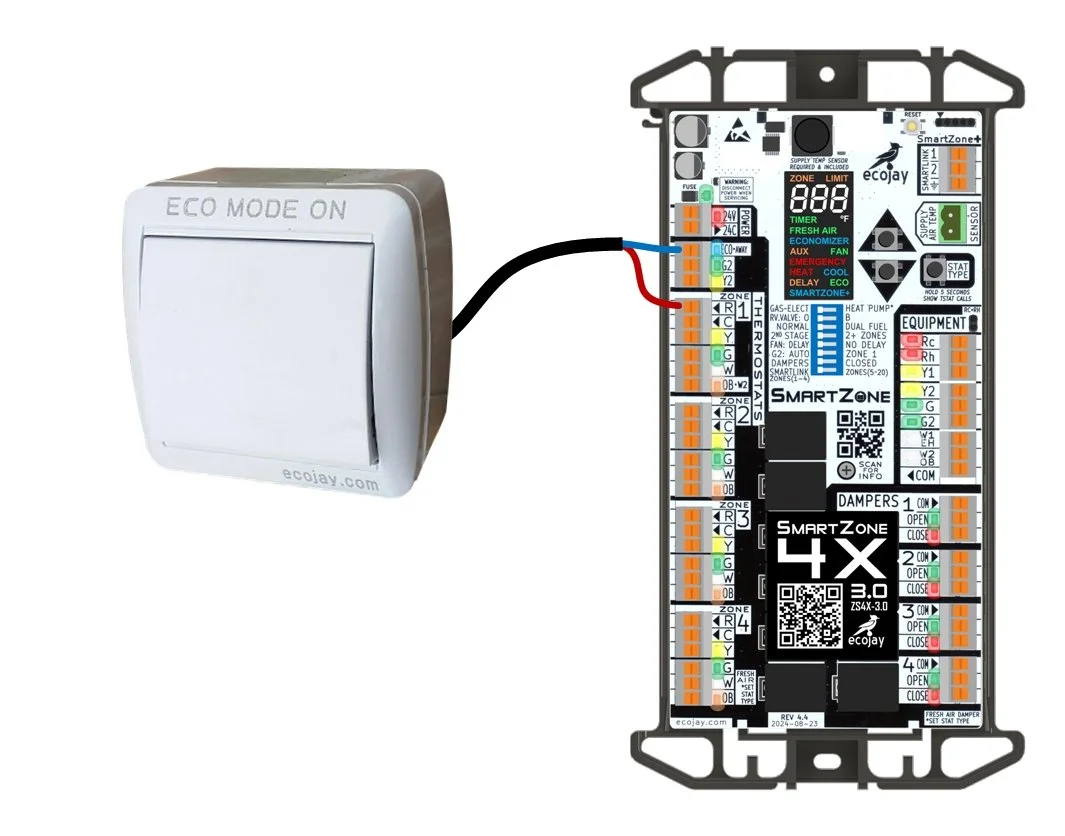
⭐ What ECO / Away Mode Actually Does
When ECO/Away Mode is active, SmartZone changes how heating or cooling is allowed to start:
✔ Only Zone 1 can energize heating or cooling equipment calls.
Zone 1 becomes the only thermostat that can initiate a call for heat or cool from the HVAC system.
✔ All other zones behave differently:
If another zone is calling for the same mode (heat or cool),
→ its damper opens, but it cannot start the equipment.If a zone is already satisfied,
→ its damper stays closed.If all zone thermostats are satisfied,
→ all dampers open (normal SmartZone behavior).
ECO Mode does not change staging, delays, fan logic, or temperature thresholds.
It simply controls which thermostats can and cannot call for equipment.
This makes it extremely useful for vacation homes, commercial buildings, sleeping areas, or any application where you want the system to run only when Zone 1 wants it, while still allowing or preventing airflow to other zones.
🔧 How to Activate ECO / Away Mode
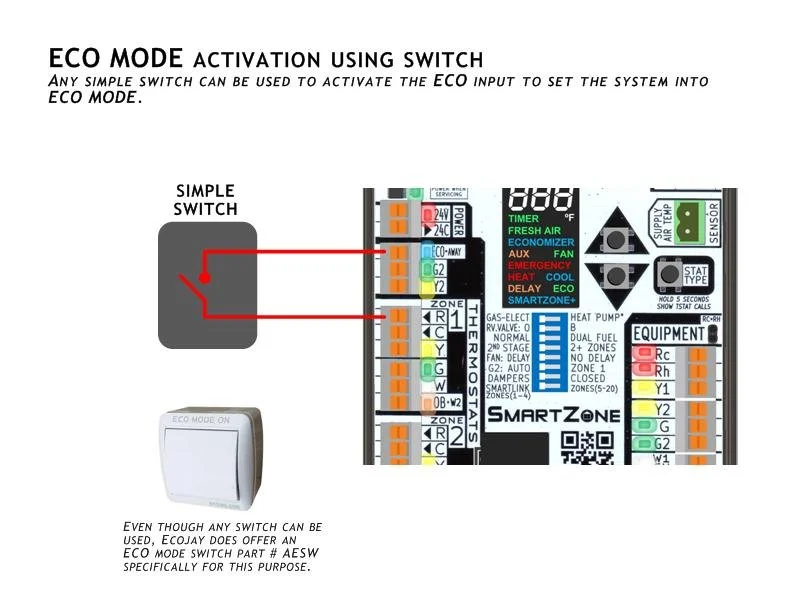
ECO/Away Mode can be activated using:
A wall switch
A relay / thermostat output
A jumper wire
Any 24VAC rated dry-contact
To enable ECO/Away Mode:
Connect 24V (R) to the ECO/Away input terminal on the SmartZone controller.
(This input is located above the Zone 1 thermostat connector.)
To deactivate ECO Mode, remove the jumper or switch the relay back to open.
This simple wiring method allows:
A manual “vacation mode” switch
Smart home automation integration
Security system integration
Time-of-day or occupancy-based control
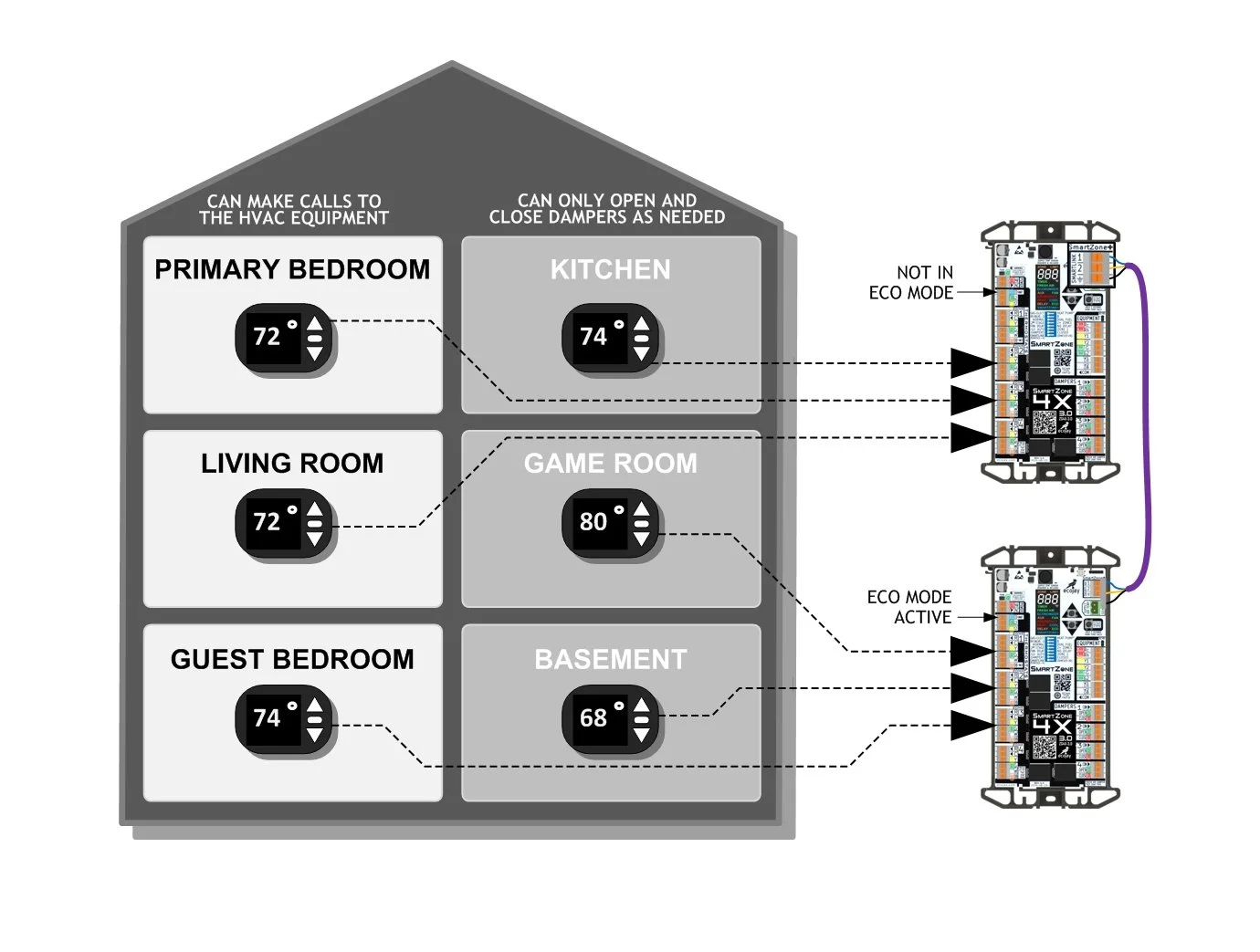
🏠 What Happens to Dampers in ECO Mode?
When Zone 1 calls (heat/cool):
Zone 1 → damper opens, and equipment runs
Other calling zones → damper opens
Satisfied zones → damper closes
When only non-Zone-1 thermostats call:
Nothing, it is as if there are NO calls to the system.
If Zone 1 begins to call, then the equipment will start and all similar calling zone dampers will open
When all zones are satisfied:
All dampers open (SmartZone default)
This ensures airflow and comfort without allowing non-primary zones to start the system.
🧩 ECO / Away Mode in Systems with More Than 4 Zones (SmartLINK)
In SmartLINK multi-board systems (SmartZone+):
Each SmartZone board has its own ECO/Away Mode input.
This allows for two different ways to use the feature:
1. Entire System ECO Mode
If you want every zone in the system to behave in ECO Mode (except zone 1):
Activate the ECO input on all SmartZone boards
Typically this is done by wiring all ECO inputs together to one switch
When the input on each board receives 24V → the whole system goes into ECO/Away Mode
Note: If separate transformers are used to power each SmartZone, then a relay should be used to isolate the ECO inputs when switched.
Best For:
Whole-building vacation mode
After-hours commercial behavior
Energy-saving schedules
Remote disable via automation
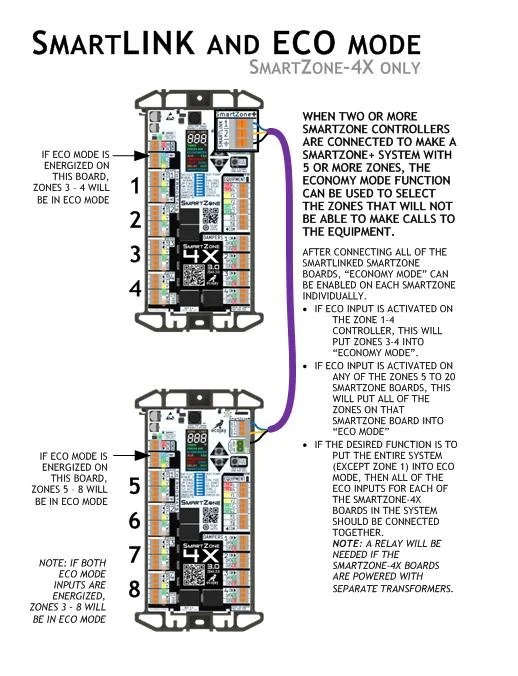
2. Selective ECO Mode (Only Certain Boards Active)
This is a powerful feature that many zoning systems cannot do.
If only certain zones should be restricted:
Energize only the ECO input on the board(s) you want in ECO Mode
Boards not in ECO Mode continue normal operation
This allows some zones to:
Start and run HVAC equipment
While others are ECO-restricted to only open and close dampers
Real Example:
A 7-zone home using two SmartZone boards:
Board A (Zones 1–4) → Normal
Board B (Zones 5–7) → ECO/Away Mode active
Zones on Board B open their dampers when calling but cannot start equipment, while Zones 1–4 operate normally.
Perfect for:
Bedrooms restricted at night
Basement or bonus room zones restricted unless occupied
Tenants, guest areas, offices, conference rooms
Selective HVAC usage in multi-story homes
📘 Why Use ECO / Away Mode?
Installers and homeowners choose ECO Mode for:
✔ Vacation / Away Mode for the whole house
Only Zone 1 keeps the system running.
✔ Preventing non-priority zones from starting equipment
Useful in commercial buildings and multi-zone homes.
✔ Energy savings without shutting off zones completely
Zones still get airflow when equipment is running.
✔ Integrating with occupancy sensors or home automation
Automation can enable ECO Mode when zones are empty.
✔ Restricting equipment starts to supervised or conditioned areas
Zone 1 becomes the “manager” zone.
🧠 Common Misunderstandings (Cleared Up)
ECO Mode does NOT:
Change temperature setpoints
Alter staging
Add time delays
Modify heat pump balance points
Increase or decrease fan runtime
Close dampers automatically to save energy
ECO Mode DOES:
Control which zones can tell the HVAC system to turn on
Keep dampers in a safe, predictable position
Allow airflow while preventing unnecessary calls
Provide selective zone enabling in SmartLINK setups
Conclusion
ECO / Away Mode on SmartZone controllers gives you fine-grained control over which zones can make equipment calls while still providing airflow and comfort across the system.
It can operate system-wide or selectively, making it one of the most flexible features in SmartZone+ SmartLINK installations.
Whether you want a whole-home vacation mode, a commercial after-hours mode, or selective equipment control per zone, ECO Mode provides a simple, reliable solution.

Wall-Mounted on/off switch for ECO Mode on all SmartZone controllers.
Simple way to get more energy savings from SmartZone. Use this switch to enable ECO Mode easily. ECO Mode puts the entire zone control system in a "setback or away" state by disabling equipment control for all zones except ZONE 1. Dampers will still open and close as needed but ONLY ZONE 1 will be able to energize heat or cooling.
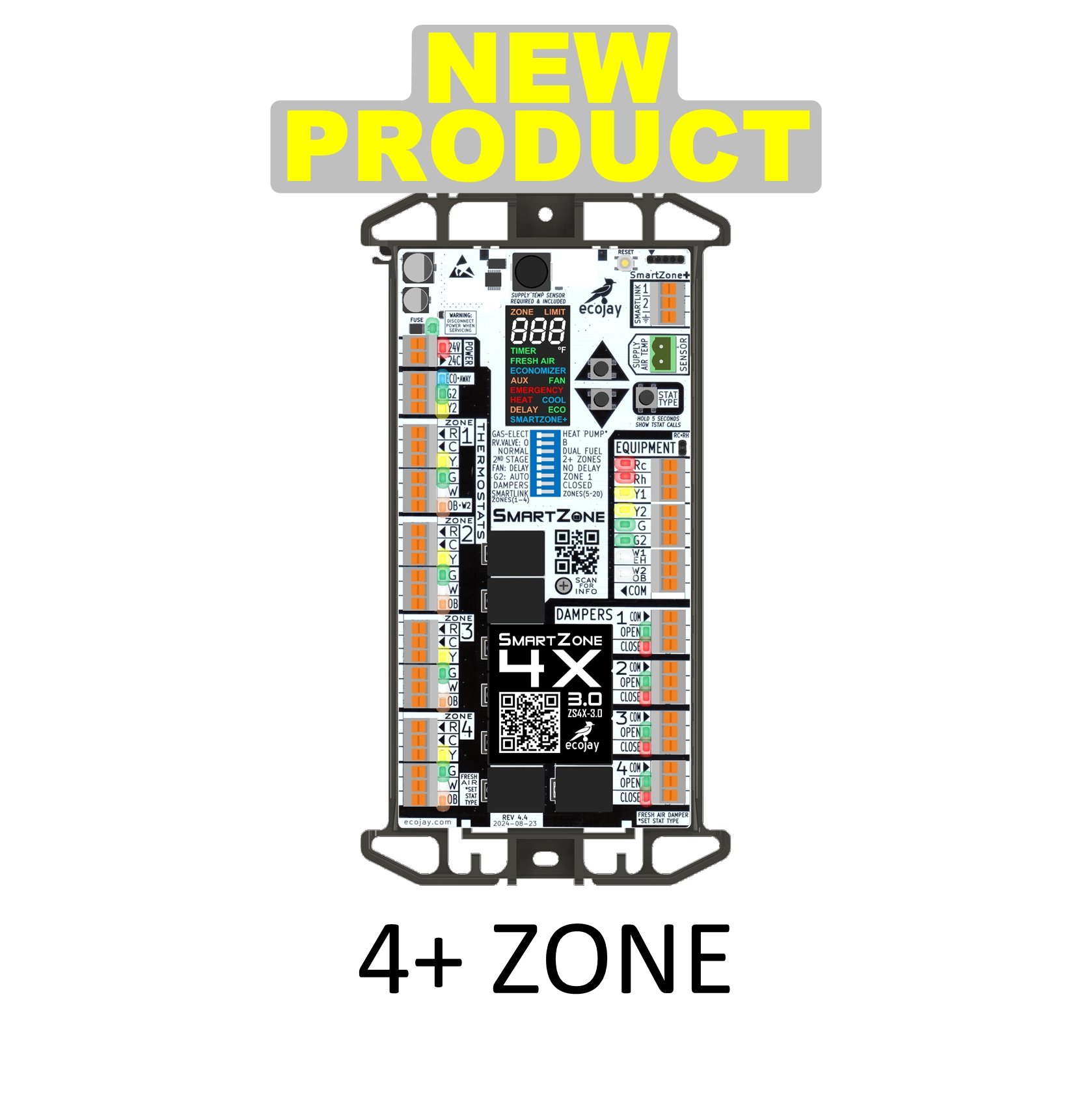
4-Zone Controller
NEW for 2025 - SmartZone better than ever
Replace almost any brand existing zone control ... use with any thermostats (including WiFi).
Control heating and cooling comfort room by room.
EASY INSTALLATION - no screwdriver or voltmeter required
UNIVERSAL COMPATIBILITY - drop in replacement for many models (see list in Additional Info)
BEST FEATURES - built in Fresh Air Control, expansion port up to 20 Zones
SUPPLY AIR TEMP SENSOR - included for Smart-Staging & equipment protection
DESIGNED & ASSEMBLED IN THE USA

NEW PRODUCT - 2025 - Shipping now!
SmartZone-3X 3.0 is the newest addition to the SmartZone family of zone controllers. It has been engineered to make installation easier than ever before. This product will replace the SmartZone-2X, giving our customers and extra zone. For those familiar with SmartZone already, you will see the similarities but with improvements including upgraded display and the addition of built-in FRESH AIR and ECONOMIZER controls.